Built in Austin for Texas schools.

Dismissal is more than a car line.

Dismissal involves more than getting cars through a line. DismissalHub brings parents, teachers, office staff, and dismissal teams together so everyone is working from the same information.
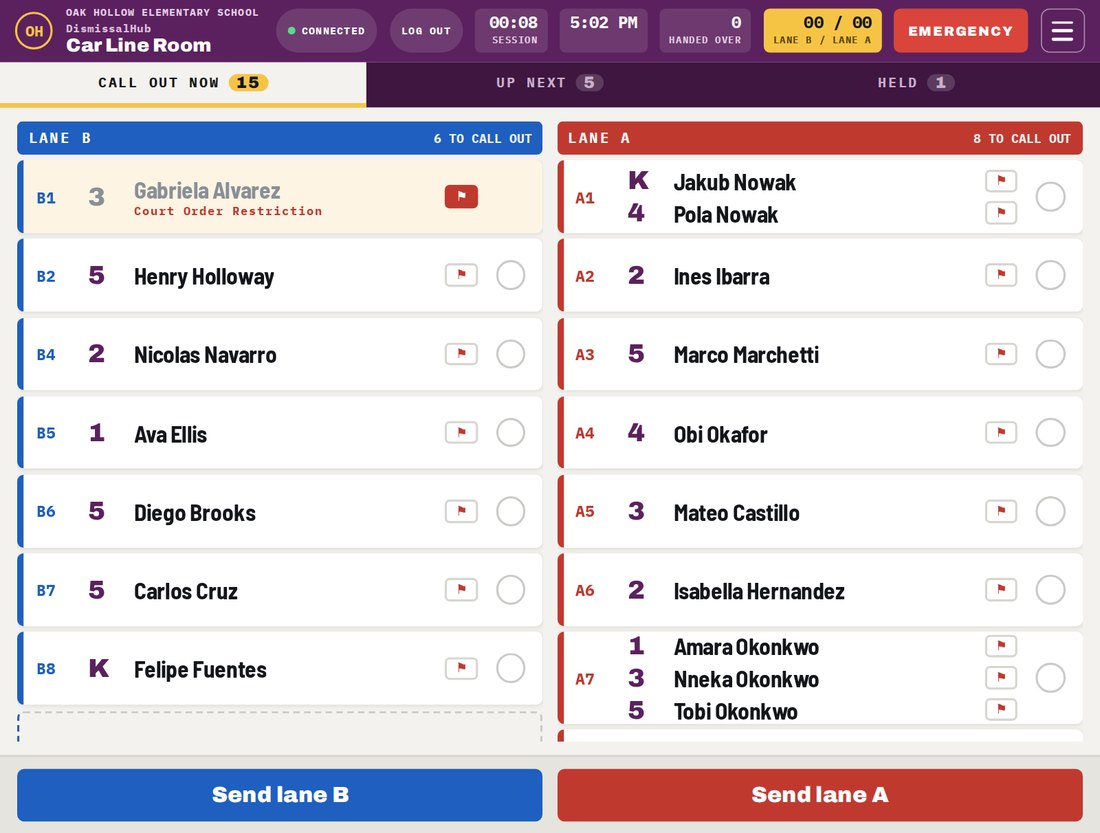
The car line room tablet showing which children to send to each bay in lanes A and B
Bay A2Handed over
No app for driversThey simply drive in and keep moving.
No camerasNo photos of plates, people, or cars.
English and SpanishFamilies can choose the language they prefer.
OneRosterImport student and family rosters from the district.

Keep the whole dismissal process in one place.

Dismissal touches more than the pickup line. There are daily plans, last-minute changes, absences, early pickups, authorized adults, staff communication, and the final handoff. DismissalHub keeps those pieces connected so the people running dismissal can see what they need, when they need it.

ParentsTeachersOffice StaffDismissal Teams

One system. One record. Everyone working from the same information.

How pickup works

  1. A car pulls in

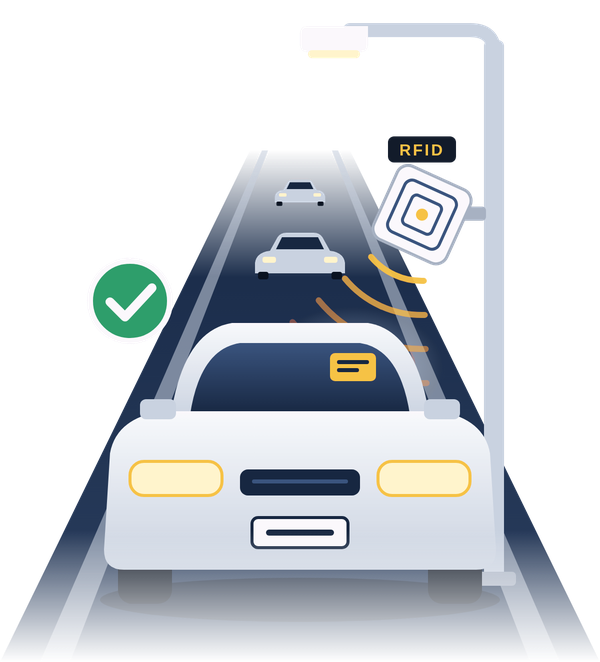
    The reader picks up the windshield tag as the car enters. The driver does not need to stop or use an app.

  2. Lane and bay

    The system assigns the car a lane and a numbered bay, so staff know where it is going.

  3. Kids head out

    The students appear on the appropriate tablet with their lane and bay, giving staff time to bring them outside.

  4. Handover

    Staff confirm the handoff at the bay. The release is recorded along with the time and staff member.

The tablets

Each station has a different job, but they all work from the same information. When something changes inside the building, the people outside see it too.

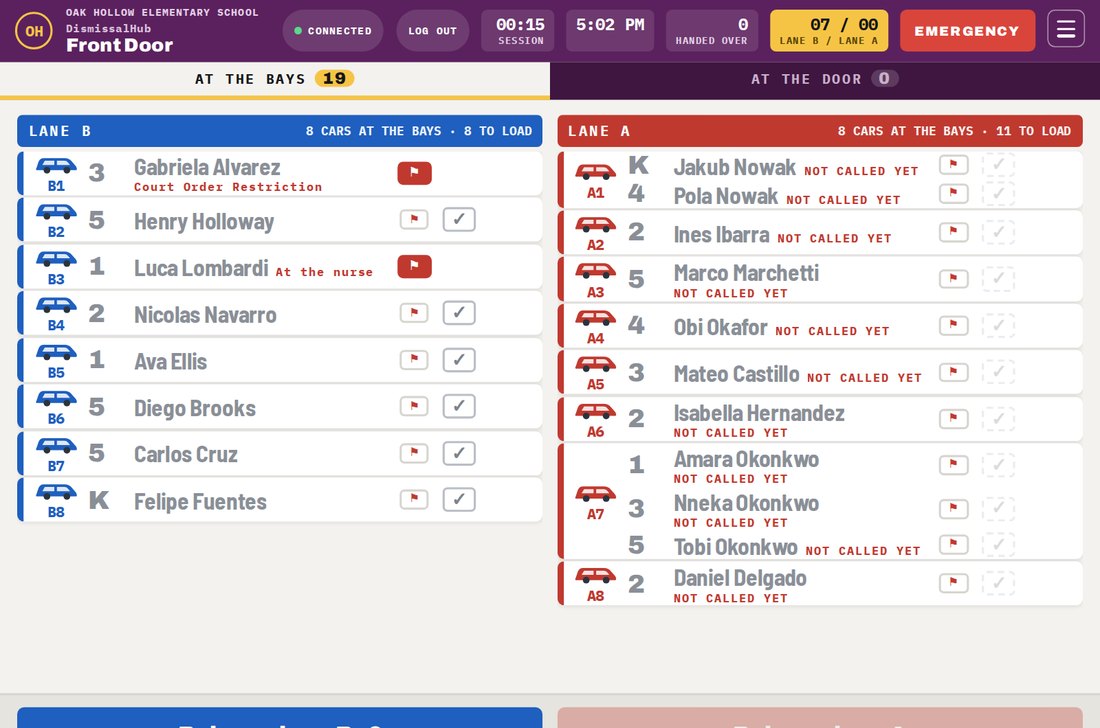
Front door tablet showing the cars at each bay in lanes A and B

Front door

Staff at the curb can see both lanes, where the cars are going, and which students are still inside. When a car is ready to move, they release it and the next car can move forward.

  • Custody and other important alerts appear before release
  • A car without a tag can be entered manually
  • Dismissal can be stopped from any tablet
Car line room tablet with the children to call out for each lane

Car line room

This tablet stays where car riders wait, whether that is the gym, cafeteria, or another room. When a car is read, its students appear with their grade, lane, and bay so staff can call them out in the right order.

  • Clear lists for call now, up next, and held
  • Place a hold and record the reason
  • Send quick messages to the other tablets
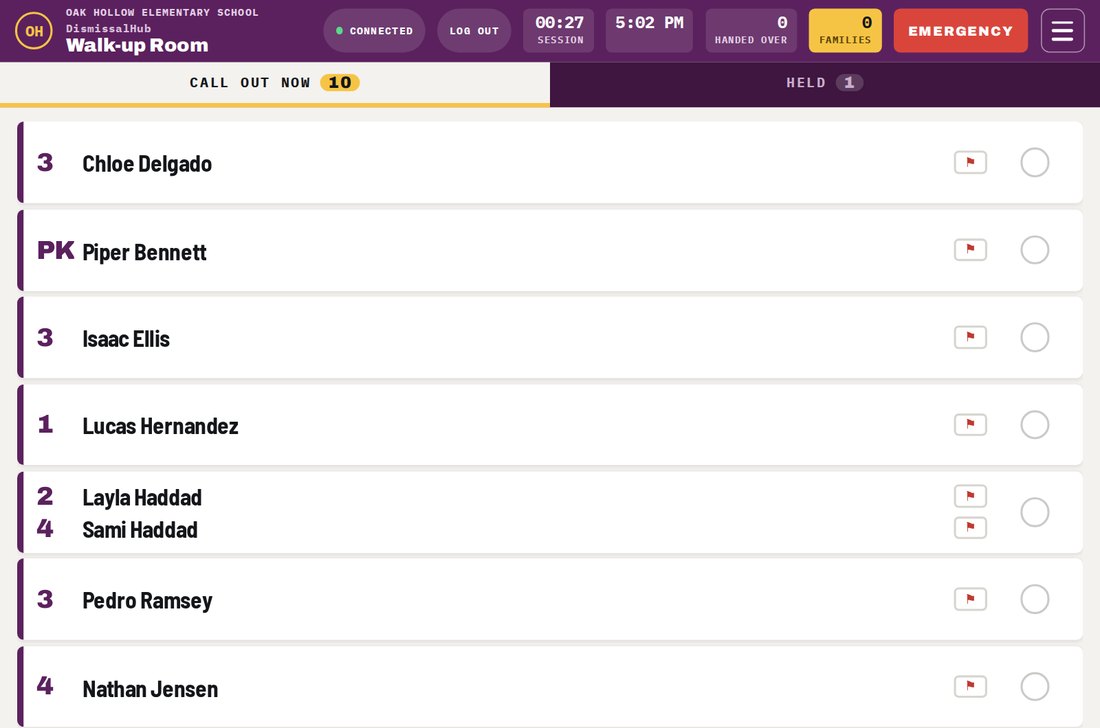
Walk-up room tablet listing the children called to the door

Walk-up room

Parents who walk in use a pickup card. Once it is read, the student's name appears on the tablet so staff can get the child moving toward the door while the parent makes their way over.

  • Holds and notes stay with the pickup record
  • A parent without a card can show ID instead

When the afternoon does not go as planned

Court orders

Important restrictions stay with the student's record and appear to staff when the family arrives.

Holding a child back

Staff can place a hold, give a reason, and remove it when the issue is resolved. Both actions are recorded.

Forgot the tag

The adult shows ID, and staff record the verification before releasing the child.

Another car

For a rental, borrowed car, or another vehicle, the office can issue a temporary placard that works like a windshield tag.

Reader down

If the regular reader is unavailable, staff can use a handheld reader or enter the tag number directly.

Emergency

Any tablet can stop dismissal. A supervisor PIN is required to lift the restriction.

Portals and the admin panel

Families, staff, and the school office each have the tools they need. The information stays connected across all three.

Parent portal

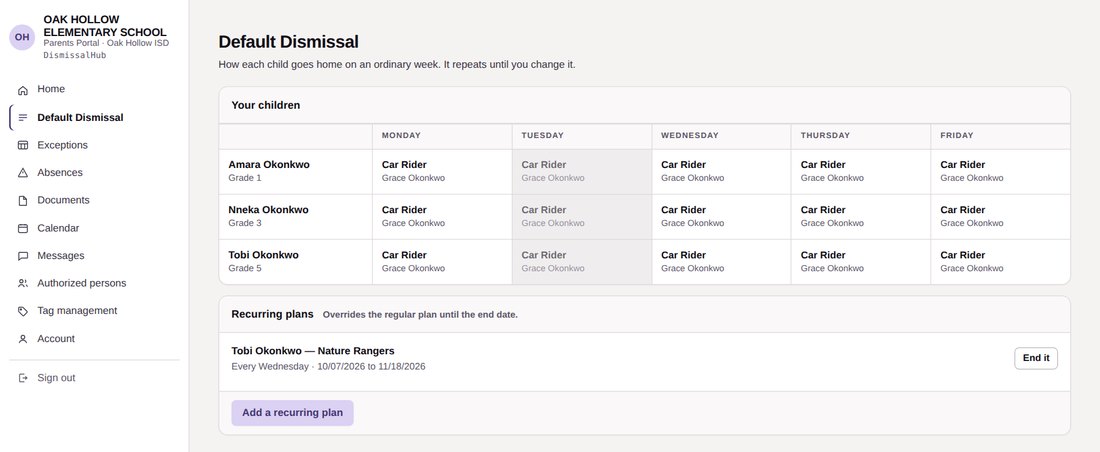
Parents can manage their own plans

Parents can set how each child normally goes home and make changes when a particular day is different. That means fewer routine changes have to go through the office.

  • Regular plans for each child
  • One-day exceptions
  • Absences and late arrivals
  • Early pickups
  • Doctor's notes and documents
  • Authorized pickup adults
  • Requests for new tags
  • Class calendar, newsletters, and Parent Conferences
Parent portal weekly dismissal plan
Staff portal

Keep school conversations in one place

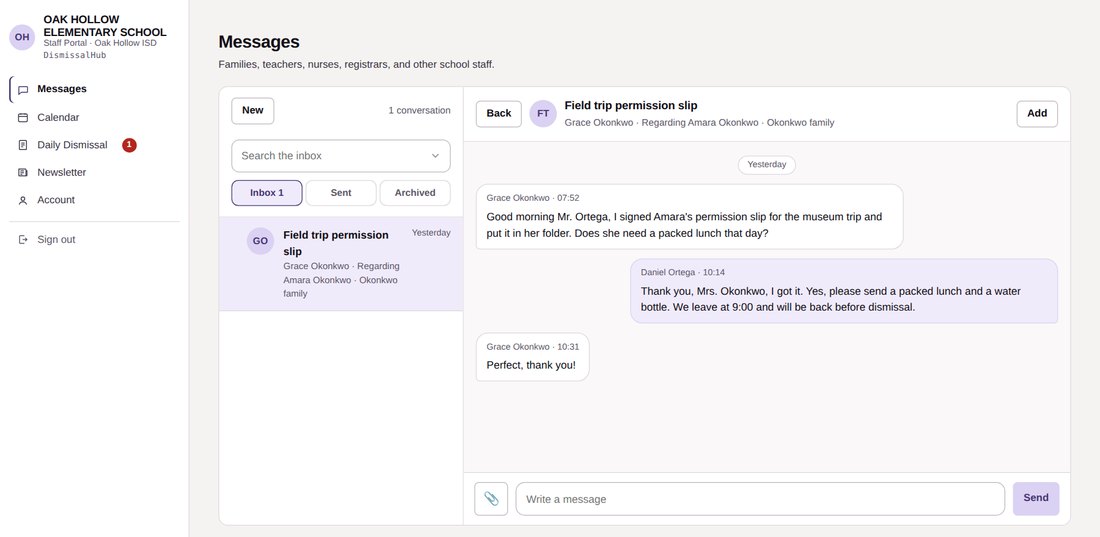
Parents can message the teacher, nurse, registrar, or front office without having to keep track of separate contact methods. Messages stay connected to the family and child, and another staff member can be brought into the conversation when needed.

  • Inbox, sent, and archived messages
  • Class newsletters
  • Class calendar
  • A daily sheet showing how each student goes home
Staff portal conversation with a family
Admin panel

The office stays in control

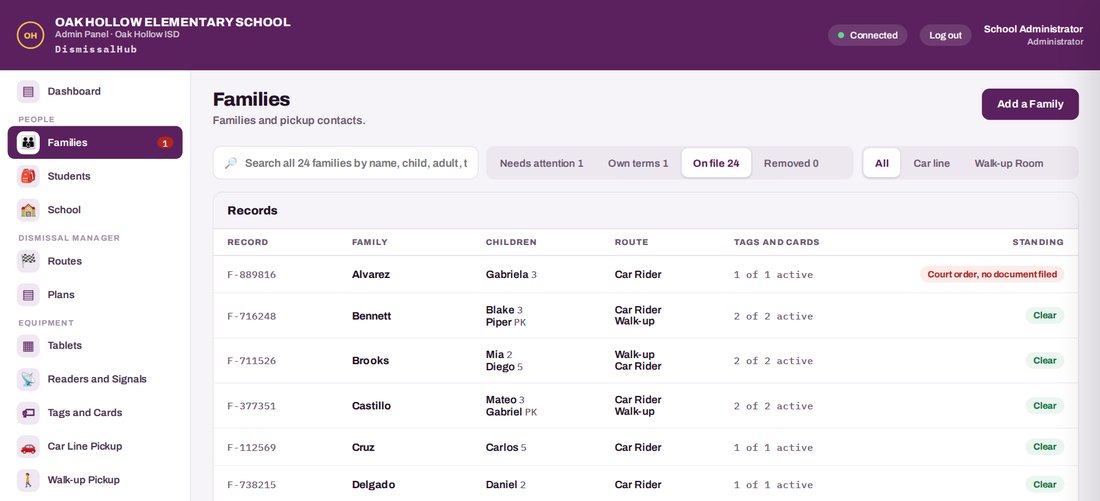
The office manages the information that drives the portals and dismissal stations. Items that need attention, such as an unreviewed custody document, can be brought forward instead of getting lost in a list.

  • Families and students
  • Classes, grades, and staff
  • Routes, lanes, and bays
  • Tablets and readers
  • Issuing and revoking tags
  • Reports and the dismissal log
Admin panel families list
A car in the pickup line passing a tag reader mounted on a light pole

About the tags

What's on a tag

The tag contains only a system number. If someone finds one in a parking lot, there is nothing on it that identifies the family, student, or school.

Lost tags

The office can disable a lost tag right away. Once a tag is taken out of service, its number is not issued again.

The log

Reads, holds, handoffs, and other important actions are recorded with the time and the staff member who recorded them. The office can search the log or export the records when needed.

Privacy & Compliance

Student data deserves careful handling.

DismissalHub is designed around FERPA, Texas student privacy requirements, and the expectations schools have for handling student and family information.

FERPATexas Education Code Ch. 32TX‑NDPA ready

FERPA

DismissalHub is designed to operate as a school official under the district's direct control, with student information used to support school operations.

Texas law

The platform is designed with Texas Education Code Chapter 32 requirements in mind and is ready to support the Texas Student Data Privacy Agreement process.

Security and privacy

Documents and ID photos are protected, administrator accounts can use two-step verification, and the system does not use cameras or track license plates.

The district owns its data

Data is stored in the United States, is not sold or used for advertising, and can be returned or deleted when the service ends.

Privacy is part of how DismissalHub is built.

Built around your school.

Every school has its own dismissal setup. Pricing is based on the campus, the way dismissal is configured, and what is needed to get the system up and running.

Launch program

The rest of this school year is on us.

Selected schools can start using the complete DismissalHub platform at no software cost for the remainder of the 2026-2027 school year.

This launch offer is available to selected schools through the end of the 2026-2027 school year.

Starting in 2027-2028

One platform, one annual price, with the tools your school needs to run dismissal.

Request a Demo & Quote

Let's look at your dismissal process.

We can come to your school, learn how dismissal works today, and show you where DismissalHub could fit into the process.

VD Solutions LLC
Austin, Texas
Request a Demo & Quote